Google Business Profile Audit Guide
Key Takeaways
- The problem is your Google Business Profile, not your website.
- Google’s local algorithm weighs three things: relevance, distance, and prominence.
- NAP consistency is foundational.
- Category selection is where most businesses get it wrong.
- Review velocity and recency beat the total review count.
- Photos, Posts, and Q&A are active ranking signals, not decorations.
- Proximity has a ceiling you can work around but not eliminate.
- Landing page alignment amplifies everything else.
- A geo-grid scan reveals where you actually rank vs. where you assume you do.
- The audit is a system, not a one-time task.
Introduction
If your business does not appear in the local pack on Google, your website is unlikely to be the issue. More often than not, your Google Business Profile is the problem, with something quietly broken inside that costs you customers daily. A Google Business Profile audit is the tool that pinpoints where things go wrong, what your competitors do better, and what you should focus on to climb the local search list. An audit gives you practical insights to improve visibility and rankings in local searches. This can lead your business to attract more customers. A Google-optimized Business Profile is key to attracting new customers and retaining your current ones. You might be a small business owner struggling to understand why your profile is not showing, or a marketer with a list of businesses ready to pay for your help. Either way, you need to understand the local pack issues that even experienced SEOs often miss.
What Is a Google Business Profile Audit
Ranking is not the only reason an audit matters. Local search changes fast. The ways users interact with results have changed with AI Overviews, zero-click behavior, and map-based choices. Google’s AI now decides which businesses to show, often based on cues from your GBP. Outdated hours, misfit categories, or old pictures may lead AI to favor a rival. By regularly auditing your GBP, you ensure every Google signal works for you—not against you.
How to Conduct a Google Business Profile Audit: A Step-by-Step Process
Start by Viewing Your Profile Through a Customer’s Eyes
Audit Your Business Name, NAP Consistency, and Core Information
Make sure your GBP links to the correct page on your website. Single-location businesses usually link to their homepage. Multi-location businesses should use a separate city landing page optimized for the GBP address. Link to a city page—for example, /houston-hvac-repair/ instead of your home page. This improves what Google calls entity alignment. When your GBP and landing page share the same story about location and services, Google trusts your listing more.
Audit Your Primary and Secondary Categories
Google lets you choose up to 10 categories for one profile. Most businesses use three or four; the rest are left blank. A complete audit checks if you filled out secondary categories. It also checks if services under each category match what you actually offer. You can select up to nine secondary categories to help your profile appear in more searches. Each category has service options set by Google. These are not for show—they influence your search visibility. Always select every service relevant to your business.
Audit Your Reviews: Velocity, Recency, and Content Quality
It is not only a form of courtesy to respond to the reviews, but a cue. The profile that continuously responds to reviews, positive or negative, shows it is active, and Google treats the listing as an active, maintained company, not a dead one. Reviews always help improve local search rankings because of interaction signals.
Audit Your Photos and Visual Content
You need to have higher quality images to establish trust with your clients. You should make use of original images of your real business, your real team members, and your actual work as much as possible. These have much more authenticity than generic images, and Google’s systems are becoming increasingly adept at detecting the difference.
Audit Your Google Posts, Q&A, and Services Sections
Pay as much attention to your Services and Products sections. These sections give you the opportunity to present a single offering in detail with descriptions and prices where necessary. Such missed opportunities include generic entries, such as plumbing services or providing legal help. Redraft these descriptions using specific, location-conscious language that reflects how your real customers discuss their requirements with you. Also, use an optimal business description of 750 characters and add local keywords and unique selling propositions to enhance search presence.
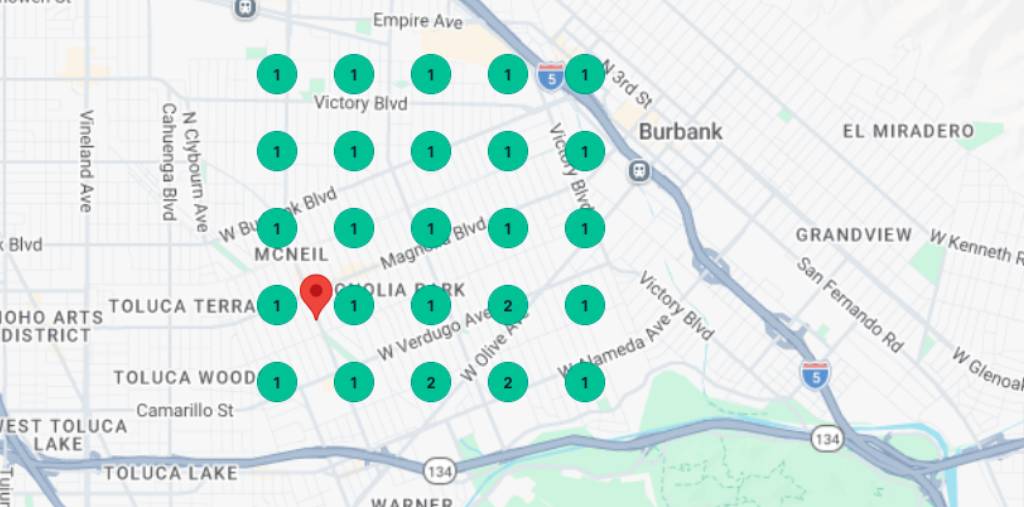
Run a Local Grid Scan to Map Your Ranking Radius
The Share of Local Voice (SoLV) metric should be of interest to you when analyzing your grid results. This number represents the percentage of grid points on which your profile is in the top three. Competitor benchmarking tools based on competitor analysis enable you to make comparisons of your SoLV to your leading local competitors, monitor your ranking among local competitors, and see what you can be doing better. To remain visible and appealing to customers periodically compare your Google Business Profile with local competitors. Competitor benchmarking also identifies missing categories and keyword gaps in your profile. No matter what, it is always informative to understand how competitors who occupy the top positions compare in review velocity and recency. Evaluate your own strategy and identify additional areas of differentiation. When the dominant player in your category has a 53% SoLV, then that is the realistic upper limit of what is viable in your industry at a particular moment in time.
Understanding Proximity and City Borders in Local SEO Rankings
How Google Uses Physical Location as a Ranking Signal
What City Borders Mean for Your Local Rankings
How to Work Within Proximity Constraints Without Violating Google’s Guidelines
Placing a GBP listing at an address where you do not physically conduct business, like a virtual office, a UPS store, or a residential address used only to receive mail, is against Google’s rules and may be suspended. The threat is not theoretical; Google proactively inspects listings about the legitimacy of the physical address and takes action against notices of violations of guidelines. Any proximity strategy to be pursued should be based on a real physical presence.
How to Optimize Your Google Business Profile for Better Local Search Visibility
Optimize Your Business Name the Right Way
Build a Fully Optimized Local Landing Page
Strengthen Your Citations Across the Web
Keep Your Profile Active with Consistent Engagement Signals
Use GBP Insights to Track What’s Actually Working
Measure the search impressions, map views, site clicks, direction requests, and phone calls and monitor them over time to better quantify the value of your GBP. Track these numbers as optimization changes and compare with previous periods to see trends and seasonal patterns. Monitoring performance and optimizing your approach to Google Business Profile are key to continuous improvement. Combining GBP Insights information with your overall SEO reporting will build a feedback loop that will make your audit an important part of a sustainable optimization system.
Prioritizing Your GBP Audit Findings for Maximum Impact
The local search environment changes constantly, competitors refresh their profiles, Google updates the weightings of the different signals, and your own business information changes. The habit that distinguishes businesses that are occasionally featured in the local pack from those that are not is conducting a structured audit quarterly and monitoring key metrics in between.
Conclusion